
A personal subscription and a work one run on the same laptop at the same time. Each has its own login, its own limit and its own skills. One line in ~/.zshrc keeps them apart.
I have two Claude Code accounts: a personal one and a corporate one issued at work. It used to mean signing out of one to sign into the other. Now it is two commands in adjacent windows.
In short. Claude Code keeps everything of its own in
~/.claude. TheCLAUDE_CONFIG_DIRvariable points it at another directory — and that is a second, independent instance: its own login, its own limit, its own history, its own skills and plugins.
An alias with CLAUDE_CONFIG_DIR
The alias lives in ~/.zshrc, the file zsh reads every time you open a terminal. You do not have to open it in an editor: copy the command below in full, paste it into the terminal and press Enter. It appends the line to the end of the file and picks it up in the current session.
cat >> ~/.zshrc <<'EOF'

# Additional Claude Account
alias claude-work='CLAUDE_CONFIG_DIR="$HOME/.claude-work" claude'
EOF
source ~/.zshrc
The quotes around EOF matter: without them $HOME is expanded on the spot, and your own path lands in the file instead of the variable.
Then two steps:
claude-work— the~/.claude-workdirectory creates itself.Sign in to the second account on the screen it shows you.
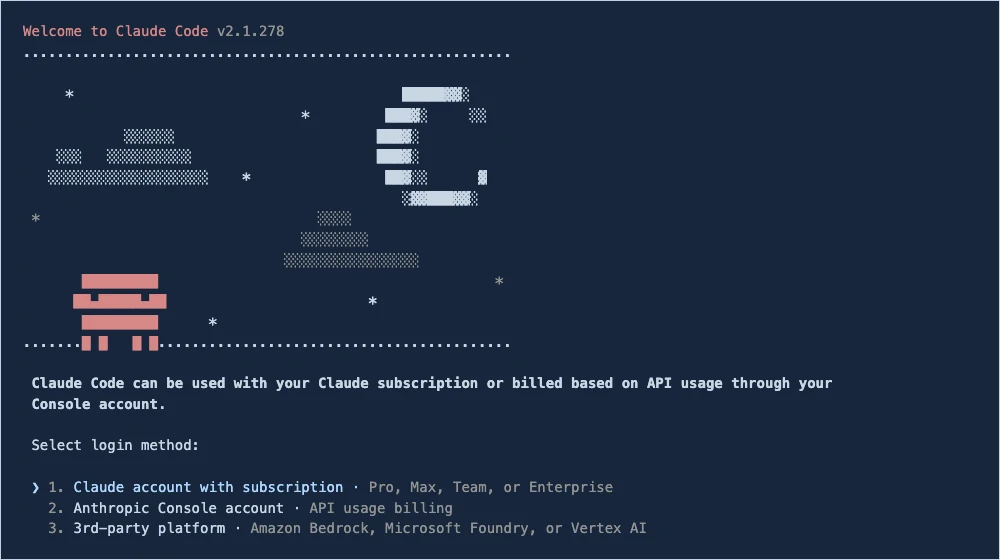
The login screen appears not because a session expired, but because this directory never had one.
It is worth making both aliases explicit rather than only the second: while one profile stays plain claude, it is easy to start it without thinking.
What is separated between profiles, and what stays shared
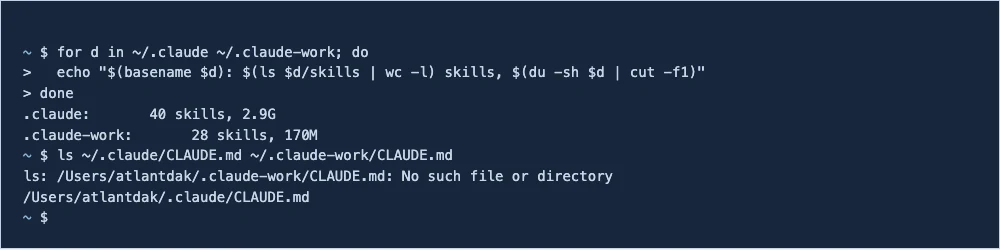
| What is separated | In each directory |
|---|---|
| Authentication | its own Keychain entry |
The global CLAUDE.md |
its own — the work one has none at all here |
| Skills | its own: 40 against 28 |
| Plugins and marketplaces | its own |
| Personal MCP servers | its own, inside .claude.json |
| History and transcripts | its own: 2.9 GB against 170 MB |
| Folder trust decisions | its own |
What stays shared is everything that lives in the repository itself: the project’s .claude/settings.json, its CLAUDE.md, its .mcp.json. They are tied to the code rather than to the account, and work the same way in both profiles.
Authentication is separated deeper than it looks: on macOS the tokens are not in the directory but in the Keychain — one entry per profile.

Each account has its own limit
Two subscriptions, two independent counters. Burn the weekly limit on the work account and the personal one sits untouched, one window away. /status shows what is left on the current profile.
The limit belongs to the account rather than to the machine: the official help states that usage limits are "shared across Claude and Claude Code, meaning all activity in both tools counts against the same usage limits". So two directories under one account will not double that limit — but they turn out to be useful for something else, which is next.
A bonus: different sets of skills
Signing in to different accounts is not required. Two directories can sit under one account and give you two sets of skills, plugins and MCP servers. Work integrations stop hovering over personal projects. The limit is shared in that case — it is one account, after all.
Moving work between profiles
Sessions live inside the profile’s directory, so the second profile will not list the first one’s history, and --resume will not find it.
But nothing needs moving. A transcript is a plain JSONL file at ~/.claude/projects/<project-path>/<session-id>.jsonl. Take the session-id from the first profile, and in the second point at that file: give the full path and ask for it to be read. Claude Code reads files — it will pick the conversation up and carry on from where you stopped.
It does not become a restored session: the context arrives as a file that was read, not as a continuation of the earlier conversation. But you will not have to retell what you spent the last two hours doing.
Two subscriptions, one laptop, no signing in and out. All of it rests on one line in ~/.zshrc.
More on working out tooling on a Mac: NTFS without a driver. And the measurements behind 48 generated avatar frames.